
Seamless Office Screen Sharing for MicroWell Devices
Overview
The software is designed specifically for users of MicroWell TVs and MicroWell Projectors who require efficient screen sharing capabilities in professional environments. It enables seamless projection of a computer’s screen onto compatible devices, streamlining workflows during presentations, remote meetings, and collaborative sessions. The solution is particularly useful for professionals working in hybrid or remote office setups, as well as individuals managing home offices with a need for reliable and secure display connectivity.
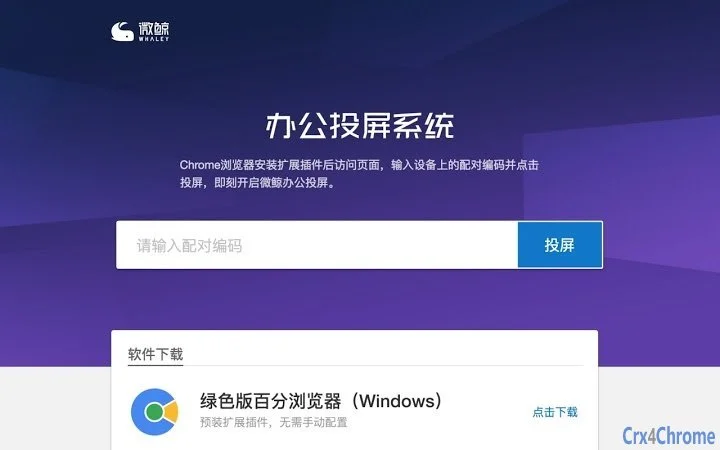
By leveraging the Chrome browser and a dedicated extension, the system allows users to initiate a connection by entering a pairing code displayed on the MicroWell device. This approach ensures minimal setup time and avoids complex configurations typically associated with traditional screen mirroring tools. The focus is on simplicity, security, and compatibility with common office tools, making it a practical choice for users who prioritize ease of use without sacrificing functionality.
The developer did not provide additional details about the organization or background. No specific user statistics or performance benchmarks were included in the release materials. However, the product’s targeted deployment on MicroWell hardware suggests a niche but focused approach to solving real-world office connectivity challenges.
Key Features & Capabilities
- Browser-Based Screen Sharing – Utilizes Chrome browser and an extension to enable screen projection without installing additional software on the host device.
- Pairing Code Authentication – Ensures secure access by requiring users to input a unique code generated by the MicroWell device before establishing a connection.
- Multi-Device Compatibility – Supports both MicroWell TVs and MicroWell Projectors, allowing users to adapt their setup based on available hardware.
- Real-Time Display Transfer – Facilitates live screen mirroring, ideal for presentations, video conferencing, and collaborative editing sessions.
- Platform-Agnostic Access – Functions across Windows and Mac operating systems, supporting flexible work environments.
Users can initiate a session by launching Chrome, installing the required extension, visiting the official MicroWell Office Casting website, and entering the displayed code. This workflow is particularly effective in office meetings where quick screen sharing is needed without prior configuration. The system is also suitable for remote workers who need to share their desktop during virtual collaboration, ensuring a consistent experience regardless of location.
User Interface, Workflow & Performance
The user interface is built around the Chrome browser environment, leveraging familiar web-based navigation. The extension appears as a small icon in the browser toolbar, providing quick access to casting functions. Users are prompted to enter a pairing code, which is displayed on the MicroWell device screen, and then confirm the connection. The process is intuitive and requires minimal technical knowledge.
Workflow efficiency is enhanced by the minimal number of steps required to begin screen sharing. From opening the browser to entering the code, the entire process is streamlined for on-the-go use. No additional software installation is needed on the computer, reducing the risk of conflicts with existing applications.
The developer did not specify resource usage details. Performance observations are based on general software behavior patterns. Stability during extended use was not documented. However, the reliance on a widely used browser and standard web protocols suggests a foundation that is generally reliable and less prone to crashes.
Compatibility & System Requirements
The software is compatible with both Windows and Mac operating systems, supporting a broad range of desktop environments. It operates through the Chrome browser and requires the installation of a browser extension to function.
Exact system requirements were not listed. The installation size is not specified. No hardware specifications such as CPU, RAM, or GPU requirements were provided. Compatibility information was partially provided, indicating support for MicroWell TVs and MicroWell Projectors as receiving devices.
Users should ensure their computer has a stable internet connection and a modern version of Chrome installed. The system does not appear to require dedicated graphics drivers or specialized hardware, which simplifies deployment across different office setups.
Pros and Cons
Pros
- Simple setup using a browser and pairing code
- Secure connection via one-time pairing codes
- Works across Windows and Mac platforms
- No additional software needed on the host computer
- Optimized for MicroWell TV and projector devices
Cons
- No official system requirements provided
- Dependent on Chrome browser and extension availability
- Performance details not disclosed
- Limited to MicroWell device ecosystem
- Relies on internet connection for operation
FAQ Section
Is the software free to use?
Yes, the software is available at no cost. There are no subscription fees or hidden charges associated with its use.
Which devices are compatible with this software?
The software is designed to work with MicroWell TVs and MicroWell Projectors. It requires the receiving device to have the “Office Casting” application enabled.
Do I need to install software on my computer?
No, the software operates entirely through the Chrome browser and a browser extension. No additional desktop software installation is required.
Is the connection secure?
Yes, each session is secured using a unique pairing code generated by the receiving device. This prevents unauthorized access and ensures only authorized users can cast their screen.
Can I use this tool offline?
No, the software requires an active internet connection to establish and maintain a screen sharing session.
Final Thoughts
MicroWell’s Office Casting solution offers a streamlined, secure, and accessible way to share screens from a computer to a MicroWell TV or projector. Its browser-based design eliminates the need for complex installations, making it ideal for professionals who value simplicity and speed. While detailed technical specifications are not available, the product’s focused functionality and cross-platform support make it a strong option for users already invested in the MicroWell ecosystem.
For remote workers, hybrid teams, and home office users, this tool provides a reliable bridge between desktop work and large-screen presentation. Its reliance on a common browser ensures broad accessibility without compatibility headaches.
Download MicroWell Office Casting now to enhance your meeting and collaboration experience.







